 Avash Mitra
Requirements
-
Prioritized requirements
- Users can upload images and view them.
- Users can like and comment on posts.
- Users can like comments.
- Users can follow (and un follow) someone.
- We need to publish a news feed.
-
Requirements not a part of our design
- Allowing users to comment on a comment.
- Implementing an auto service.
- Allowing users to mute or block someone.
- Implementing a chat service.
Database design to allow users to like and comment.
So before we jump into the E-R diagram for our database let's think of the queries we need to handle
- Find the number of likes on this post.
- Find all the comments on this post.
- Find all the people who have liked this post.
- Get all the posts posted by this user.
To answer all these queries efficiently we need four tables
-
Likes table
- ID - Uniquely identifies each row in this table
- Type - Whether the parent is a post or a comment
- ParentID - ID of the comment or the post.
- Active - Whether the like is deleted or the user who liked exists or not.
- UserID - User who liked the comment or post
- timestamp - Time at which user liked the comment or post
-
Posts table
- posted - Each post has a unique ID.
- UserID - User who made the post.
- Caption - Textual information for each post.
- ImageURL - URL of the image stored in a file system.
- timestamp - Time at which the file was uploaded.
-
Comment table
- commentID - Each comment has a unique ID
- Text
- Timestamp - Time at which the comment was made.
- PostID - ID of the post where the comment was made.
- UserID - ID of the user who commented.
-
Activity table
- ParentID - ID of the post or comment.
- NumOfLikes - It stores the number of likes on a post or comment.

Now we can answer all the above-mentioned queries easily.
- Find the number of likes on this post.
SELECT NumIfLikes from Activity
WHERE ParentID = "....";- Find all the comments on this post.
SELECT * from Comment
WHERE PostID = "....";- Find all the people who have liked this post.
SELECT UserID FROM Likes
WHERE ParentID = "...";- Get all the posts posted by this user.
SELECT * from Posts
WHERE UserID = "....";
Storing images uploaded by users
There are 2 ways to store images
- We can store images as a file in File systems.
- We can store images as BLOB in databases.
Trade-offs
-
Storing images as File v/s Storing images as BLOB
-
Features provided by the database when storing images as BLOB
-
Mutability: When we store an image as a BLOB in the database we can change its value. However, this is useless as because an update on an image is not going to be a change in a few bits. We can simply create a new image file.
-
Transaction guarantee: We are not going to do an atomic operation on the image. So this feature is useless.
-
Indexes: We are not going to search the image by its content (which is just 0's and 1's) so, this is useless.
-
Access control: Storing images as BLOBs in the database provides us access control, but we can achieve the same mechanisms using the file system.
-
-
Features provided by the file system when storing images as files
-
They are comparatively cheap.
-
They are comparatively faster because they store large files separately.
-
Files are static, so we can use CDN for faster access.
-
So for storing user images we will use Distributed File System
-
Allowing users to follow other users
We have to design our database so that we can answer these 2 queries efficiently:
- Who are the users who follow X?
- Which users does X follow?
We can answer both the queries using a single table
Schema for Followers table
- ID - Each row has a unique ID.
- FollowerID
- FolloweeID
So if we have a row
| ID | FollowerID | FolloweeID |
|---|---|---|
| 1 | X | Y |
It means X follows Y.
Now let's answer both these questions
- Who are the users who follow X?
SELECT FollowerID from Followers
WHERE FolloweeID = "X";- Which users does X follow?
SELECT FolloweeID from Followers
WHERE FollowerID = "X";
Designing the user feed service
Components required
-
Gateway service
- It receives the request from the user and routes it to the required service.
- It works with the load balancer to maintain a snapshot of the entire system. It uses the snapshot to route the requests.
- It also provides additional features like rate limiting, verification of tokens, etc.
- It converts the protocols like HTTP or XMPP to internal protocols.
-
Load Balancer
- It decides which request should be routed to which service.
(Note: We do not want to ask the load balancer whenever there is a new request. So it maintains a snapshot of the entire system in the gateway. It is the load balancer's responsibility to update the snapshot if there are any changes).
-
User Feed service
- It receives the userID and returns the (top) posts accordingly.
-
Posts Service
- Stores information about the posting user has made. It sends all this information to the user feed service.
-
Follow service
- Stores the follower information (as discussed above). It also sends this information to the user feed service.
Description
To get the user feed for a user (let's say X) we can do the following
- Get all the users X follows (Let's say the list of users is User[]).
- Get all the posts made User[].
Diagram
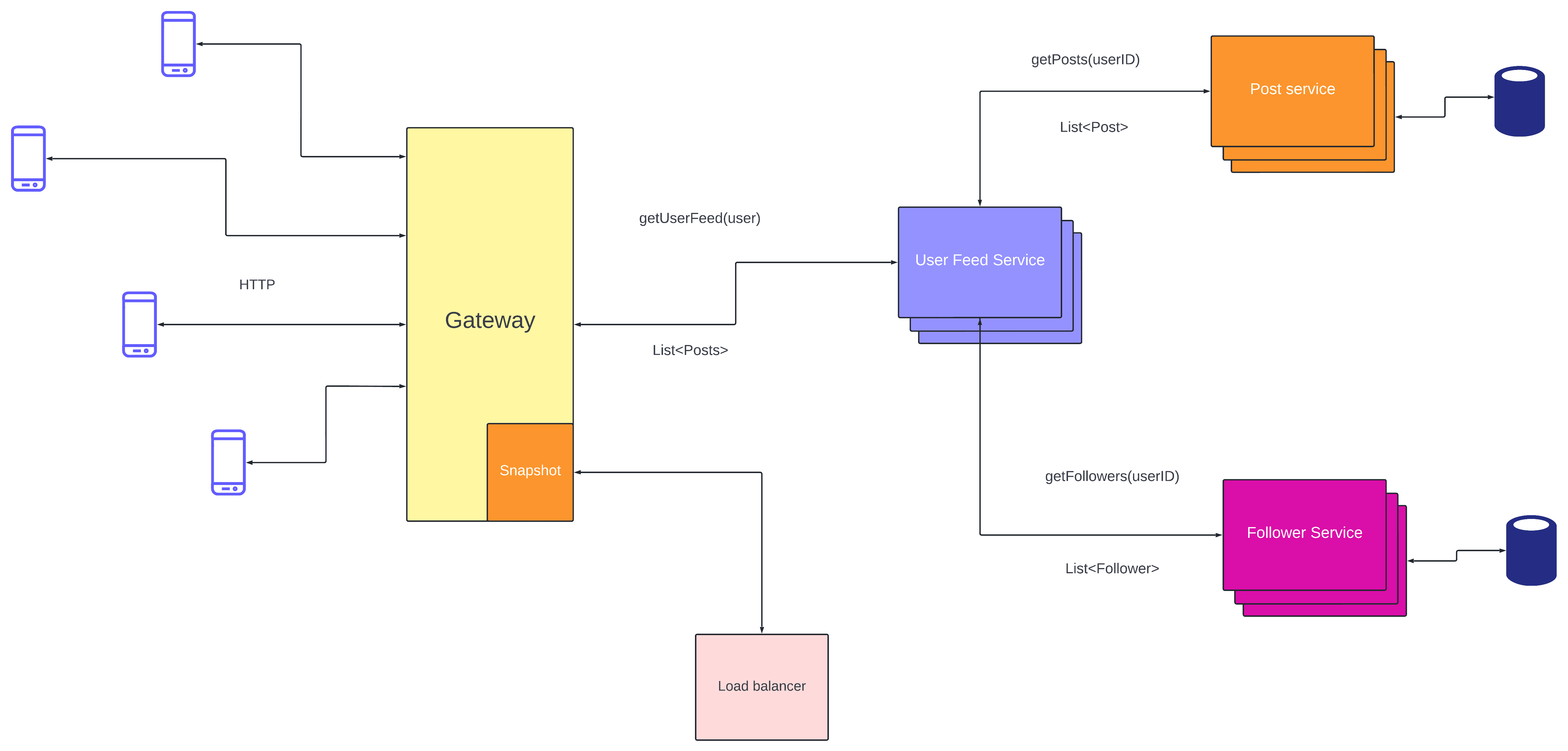
Now, this approach is simple to understand and implement however it is not scalable because we are recomputing the user feed for each user request. (And this computation is expensive. Every time we get a post we also need all its metadata like the number of likes and comments, users who liked the posts or commented, etc.)
Scaling the user feed
We know that computing the user feed for each request is expensive. To overcome this we can precompute feed. So every time there is a request for user feed we just send the precomputed result.
But how do we precompute the user feed ?
User feed is just a collection of posts made by users that I follow. So every time a person that I follow makes a post my feed should be updated. That means when there is a new post the post service should notify the user feed service.
For example, X made a new post. Post-service persists the store in the database and sends a notification to the user feed service. Now user feed service finds all the followers of X and updates their user feed. We can then store the feed in a cache. We can implement LRU cache to store the feeds of users who were active recently. That way we are not wasting space for inactive users. Caches also have faster response time and in case of failures, we can simply precompute the result once the system restarts.
Every time there is an update in the user's feed we can push a notification to those users (We can implement this using web sockets).
Diagram

But what happens if someone with million followers makes a post?
When they make a new post we have to send a notification to million users. This will cause a fanout and most likely crash our system.
There are two ways to solve this problem
-
Sending notifications in batches We can send notifications to users in batches. For example, we can send a notification to 2000 users, and then after 5 seconds, we can send notifications to the next 2000 users, and so on.
-
Pulling notifications from service Instead of pushing notifications to users. Client applications will be periodically polling the servers for any updates. If there is an update they will be pulling the update from the servers.
The push model is much more seamless. Whenever there is an update we can immediately push notifications to users. But it also causes a fanout. So which model should we choose?
We can go for a hybrid model. If a user has fewer followers then we can simply push the updates. But for celebrities for people with a lot of followers, we implement a pull model to avoid fanouts.
That's it for now!
You can check out more designs on our video course at InterviewReady.