 Gaurav Sen
On the 12th of November, 2026, Microsoft Outlook had a major global outage.
Microsoft's incident report puts the start at 4:20 PM UTC that day. Active impact ended at 4:10 PM UTC the next day, 23 hours and 50 minutes later.
Most users couldn't open their mailbox in Outlook. Email was delayed, Teams search and presence were affected, and most Microsoft 365 Copilot prompts failed.
Microsoft's engineers faced two problems:
- A defect that had been in production for more than three months, and no test had found it.
- Servers that were restarted took traffic at once and failed again.
In this blog we will see how a lock in Windows, a Teams failover and a maintenance window took Outlook down for a day.
1. Lock contention
Every request to Exchange Online, the mail service behind Outlook, passes through a network gateway server. A gateway stands in front of the services behind it.
A lock lets one process use a shared resource at a time. A process that arrives while another holds the lock waits for its turn.
The first problem was a lock contention bug in Microsoft's network gateway servers.
This bug caused multiple processes to wait on a particular resource, wasting the CPU and memory of the entire system till it was exhausted.
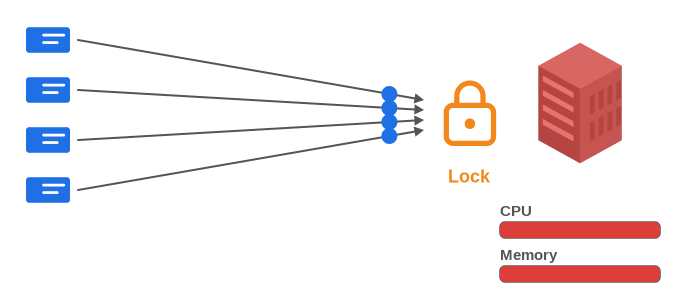
The lock sat inside an internal Windows process. Once the server's CPU and memory ran out, it stopped responding.
Many processes waiting on one lock is called lock contention.
The defect came from an update enabled on Microsoft 365's gateway servers. Neither the update nor the defect applies to other Windows deployments.
2. Why no test caught it
The update started deploying in July 2026. It went through Microsoft's safe deployment process and reached every region over several weeks.
For more than three months it ran worldwide without an incident.
Newer hardware with more cores was more susceptible to this bug, and hence, it wasn't caught during testing then.
More cores let more requests reach the lock at the same moment. On a machine with few cores, requests pass through the lock one after another. On a machine with many, most of them wait.
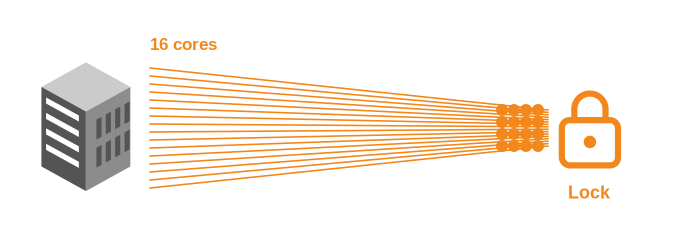
Microsoft's load tests ran on older machines with fewer cores, and with a different mix of traffic. The service's newer machines had more cores.
3. Two gateways
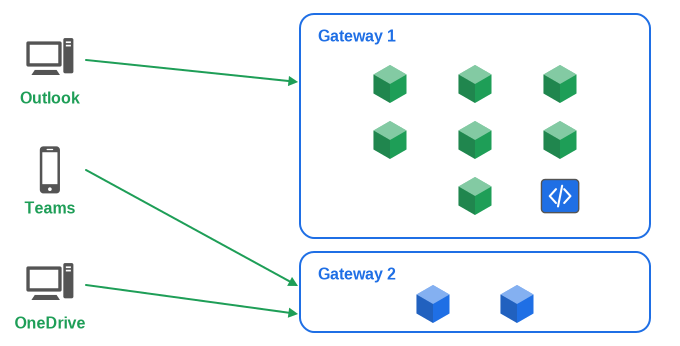
Microsoft 365 runs two independent network gateway systems. If one has trouble, a service can fail over to the other.
At 1:07 AM UTC on the 12th, a routing issue in the US East region made Teams connections time out. The automatic failover moved Teams traffic onto the other gateway, the one that also carries Exchange Online.
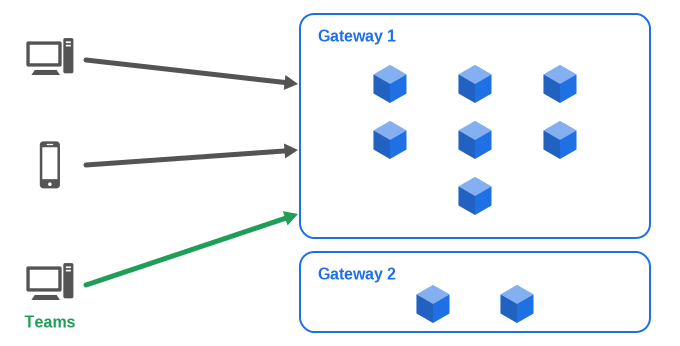
Microsoft says failovers like this are routine and haven't hurt Exchange Online before. For about 16 hours, everything stayed healthy.
The gateway servers weren't yet serving their daily peak of traffic.
4. Cascading failure
Two more conditions came together with the Teams failover: fewer servers in service, and peak traffic.
Some of the network gateway servers, 14% of them, had been removed.
Microsoft was deploying the latest version of the service to those servers, a routine operation. The service keeps spare capacity for this, and Microsoft says losing 14% would not have caused an impact on its own.
There was increased load because this was the peak window of traffic in the United States.
At about 4:00 PM UTC, with US traffic approaching its daily peak, failures in North America became broad.
Peak traffic, the Teams failover and the missing servers together made the gateways hit the bug. Requests built up until servers stopped responding.
What happens to the servers that are still standing? Take three servers behind a load balancer, each running at 60% capacity.
S1 fails. Its 60 units of work are shared equally, so S2 and S3 each carry 30 more. At 90%, a server is likely to fail.
| Step | S1 | S2 | S3 |
|---|---|---|---|
| All three running | 60% | 60% | 60% |
| S1 fails | down | 90% | 90% |
| S2 fails | down | down | 180%, more than it can carry |
As the network gateway servers started to crash, the remaining load fell on the remaining network servers, which themselves started getting overwhelmed and crashing.
This is called a cascading failure.
The gateway is made of thousands of capacity units, each a shard of servers and networking. When servers in one unit stop responding, Microsoft's traffic management sends their traffic to healthy units in the same region.
That is what normally keeps the service up. This time the healthy units had the same bug, and the extra load made them trip it too.
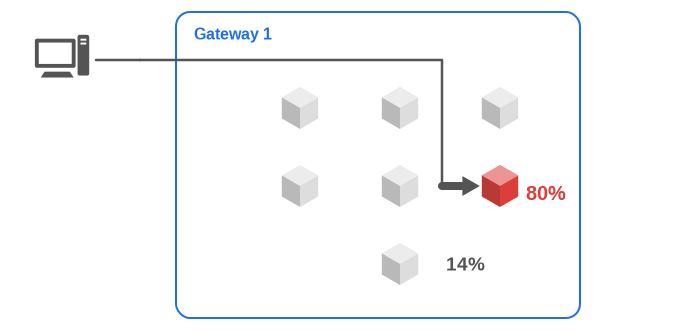
In less than two hours, the defect was triggered across a large part of the North American fleet. At the lowest point, more than 80% of the servers there were unresponsive.
When a region ran out of healthy capacity, traffic management sent traffic to other regions. They had the same bug. Within about two hours, servers in every region were affected.
5. Why recovery took a day
The first step was to move Teams and OneDrive onto the other gateway. SharePoint and the Office apps went with them, and that took load off the failing one.
Although many of the services like Teams and OneDrive were fault-tolerant and moved on to different networks, other Microsoft apps continued to be down.
The engineers tried to restart the servers, but they kept crashing.
Clients had queued up while the servers were down. A restarted server took traffic at once, and the whole queue landed on it. It stopped responding again.
Many clients rushing one server at the same moment is called a thundering herd.
Microsoft's automated recovery wasn't built for this.
Rolling back didn't help either. The change was months old, so the usual safeguards for a recent change couldn't revert it quickly:
- Stopping a config rollout.
- Rolling back a deployment.
- Switching off a newly enabled feature.
It was also hard to find, because the change was months old. Tracing the defect to it took longer.
At 7:20 AM UTC on the 13th, engineers applied an update that reverted the defective change on part of the capacity. Every server needed five steps:
- Take the server out of service, so it takes no load when it restarts.
- Restart it from its unresponsive state.
- Apply the patch.
- Restart it again, so the patch is active.
- Put it back into service.
Microsoft took large groups of capacity units out of traffic rotation and recovered all of their servers at the same time. Then it returned the group to service and repeated this in every region.
With regions starting to come back one by one, the overall outage was finally dissolved.
| Time (UTC) | What came back |
|---|---|
| 13 Nov, 11:00 AM | Recovery actions finished across parts of the Asia Pacific region |
| 13 Nov, 11:35 AM | Availability in Europe |
| 13 Nov, 2:17 PM | Outlook on the web, globally |
| 13 Nov, 4:10 PM | No customer in active impact |
No mail was lost, and all queued messages were delivered. Microsoft extended the retry window from 24 to 48 hours before a sender gets a non-delivery report. Some delayed messages to consumer mailboxes inactive for more than 30 days did expire.
Microsoft says the incident was not a cyberattack, and the change was not caused by AI tooling.
6. What Microsoft is changing
Microsoft's report ends with a table of what it will change. It gives each fix a quarter, or TBD.
| What went wrong | What Microsoft will change | When |
|---|---|---|
| Traffic distribution cascaded failures to other regions | Fix it so a failure stays in its region | Q4 2026 |
| A routing issue in one region moved all Teams traffic worldwide | Teams fails over only for the affected region | Q4 2026 |
| Servers were overwhelmed on return to service | Ramp traffic up gradually, with admission control when servers rejoin | TBD |
| Testing didn't match the hardware and traffic | Load test on the newest, highest-core machines with real traffic, at peak limits | Q1 2027 |
| First customer notification came about 20 minutes after broad impact | Detect faster and notify automatically | Q4 2026 |
For how one failed server loads the next, and what Facebook did about it, continue with How one failed cache server takes down the rest.
Summary
- On 12 November 2026, from 4:20 PM UTC, most Microsoft 365 users couldn't reach Exchange Online. Active impact ended at 4:10 PM UTC on 13 November.
- A lock contention defect in Windows on the network gateway servers made servers run out of CPU and memory. It was deployed in July 2026 and ran unnoticed for more than three months.
- Newer machines with more cores contended more for the lock. Microsoft's load tests ran on older machines with fewer cores.
- Teams failed over onto the gateway that carries Exchange Online, 14% of the servers were out for maintenance, and US traffic approached its peak.
- As servers failed, their load fell on the rest. This is a cascading failure. More than 80% of the servers in North America were unresponsive at the lowest point.
- Restarted servers were overwhelmed by queued clients and failed again. This is a thundering herd.
- The fix was an update that reverted the change. Each server needed two restarts, one before the patch and one after.
- Microsoft is changing how traffic spreads across regions, how Teams fails over, and how servers rejoin.
Sources
- Post Incident Report for Microsoft 365, EX1550543 and MO1550821. Microsoft. Final report, 20 November 2026, published in the Microsoft 365 admin center under Service health. Incident status: Microsoft 365 status.
- Preliminary Post Incident Report for Microsoft 365, EX1550543 and MO1550821. Microsoft. 15 November 2026, superseded by the final report. Copy hosted by Next.