 Aryan Oberoi
If you’ve been following the explosion of generative AI, you’ve seen the stunning images from Midjourney and the playful videos from Runway. The narrative often focuses on the prompt, the magical phrase that conjures a vision. But for those of us building the future of synthetic media, the real magic isn’t just in the incantation; it’s in the orchestration. Enter ComfyUI, the unassuming, powerhouse tool that is becoming the invisible editor of the AI filmmaking world. This article focuses on how ComfyUI exposes diffusion model internals to enable controllable, repeatable AI filmmaking workflows.
Let’s be clear: ComfyUI is not your typical polished consumer app. When you first open it, your reaction might be one of horror or delight, depending on your temperament. It presents a stark, grey canvas of nodes, wires, and cryptic labels like “KSampler,” “CLIP Text Encode,” and “VAE Decode.” It looks less like creative software and more like a visual programming interface for engineers. And that’s precisely its superpower.
The Node-Based Paradigm: From Prompt to Precise Process
At its core, ComfyUI is a graphical front-end for diffusion models. It doesn’t hide the diffusion pipeline; it exposes every single component as an interconnectable node. This is a fundamental shift.
In most UI’s, you type a prompt and hit “Generate.” It’s a black box. In ComfyUI, you build the generation process.
- The Text Encoder Node: You feed your prompt here, but you can also feed a separate prompt for negative guidance. You can even blend multiple prompts with different weights.
- The Sampler & Scheduler Nodes: You choose exactly how the AI denoises the image, the steps, the algorithm (Euler, DPM, Karras). This is where you fine-tune the balance between speed and quality.
- The Model & LoRA Loader Nodes: You can hot-swap different foundational models (like SDXL, PixArt) and inject specialized LoRAs (character styles, specific aesthetics) dynamically within a single workflow.
- The Latent Space Nodes: This is the heart of control. You can manipulate the latent representation, the AI’s “idea” of the image, before it’s even decoded. Scale it, interpolate between two latents, add noise in a controlled way.
Why does this matter for filmmaking? Because filmmaking is about control, consistency, and repeatable processes. You can’t make a 5-second shot by mashing the “generate” button 120 times and hoping for consistency.
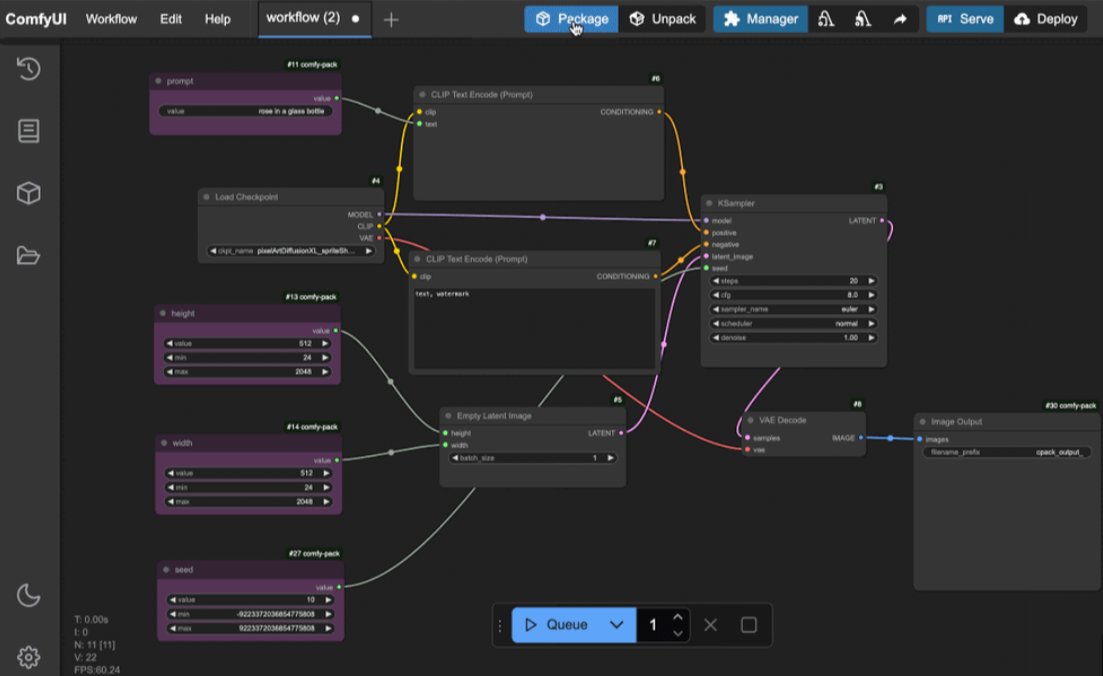
A typical ComfyUI diffusion workflow. Each node represents a discrete stage in the generation pipeline, enabling fine-grained control over the filmmaking process.
The ComfyUI Filmmaking Toolkit: Building Scenes Frame by Frame
Here’s how this node-based logic translates to practical AI filmmaking.
1. Character & Style Consistency: The Holy Grail
This is the biggest challenge. In ComfyUI, we don’t just use a reference image. We build a character latent workflow.
- We generate a perfect character still using a specific model and LoRA.
- We then extract key data from that generation, the exact latent seed, the CLIP embeddings, even the noise pattern.
- These are fed as fixed inputs into a new workflow designed for animation. The model now has a locked-in “concept” of the character, which we can pose and place in new scenes using ControlNet nodes (OpenPose for skeleton, Depth for scene integration). The visual style remains intact because the underlying model and conditioning are constant.
2. Controlled Camera Motion: Beyond Simple Panning
With nodes like IPAdapter, we can impose the composition and feel of a real filmed shot onto a generated scene. Find a beautiful drone shot from a film? Run it through IPAdapter in ComfyUI, and your AI-generated landscape can adopt its exact cinematic framing and motion blur.
Furthermore, tools like AnimateDiff are integrated as custom nodes. You’re not just running a one-click animation; you’re wiring the motion module into your carefully constructed character pipeline. You control the motion intensity, the context length, and can even use region-specific prompting to keep the background static while only the character moves.
3. The Power of Batch Processing & Scripting
A film is a sequence. In ComfyUI, you can set up a workflow that takes a queue of prompts, your shot list, and processes them sequentially with the exact same settings. Change the background prompt for shot 2, keep the character node identical, and render. It’s assembly-line precision for creativity.
Advanced users write simple Python scripts to modulate parameters frame-by-frame, creating smooth transitions in color, style, or prompt emphasis, the foundation of a coherent narrative flow.
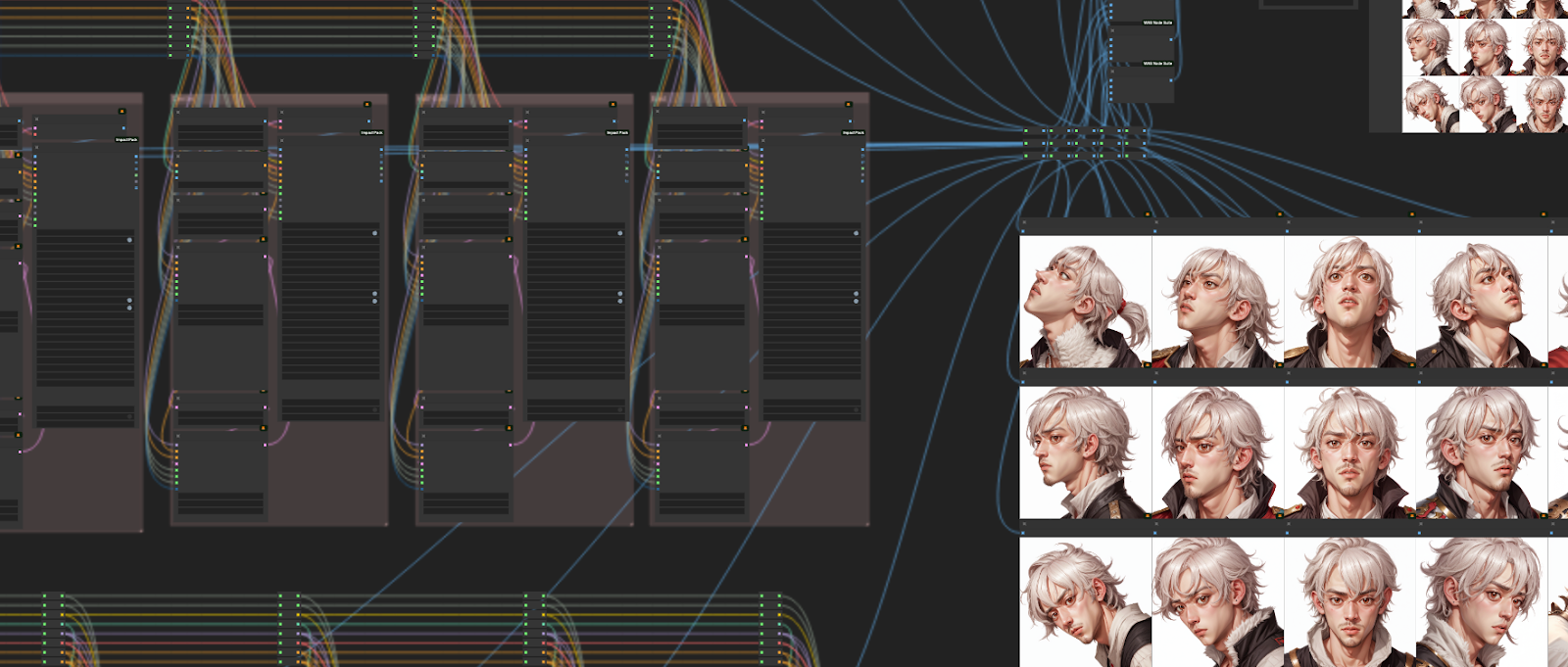
A simplified view of maintaining character identity across shots using locked latents and ControlNet.
The Community & The Future
ComfyUI’s true acceleration comes from its open-source, modular nature. Platforms like CivitAI are full of custom nodes built by researchers and artists: for upscaling, for specific film looks, for voice-synced facial animation. It’s a toolkit in constant, rapid evolution.
Is it for everyone? Absolutely not. It requires patience, a systematic mind, and a willingness to learn the machinery of diffusion. But for the AI filmmaker, the researcher, or the studio looking to build a scalable pipeline, it is currently unparalleled.
It represents a critical maturation of the field: a move from generating images to engineering visual processes. We are no longer just painters at an easel; we are cinematographers, lighting technicians, and editors, building the very studio where our AI-powered films come to life. The interface is the studio floor, and every cable we connect brings us closer to a truly directable synthetic reality.
Frequently asked questions
How do I install ComfyUI?
ComfyUI is lightweight and straightforward to set up for anyone familiar with Python-based workflows.
- Clone the official ComfyUI repository from GitHub
- Ensure Python 3.10+ is installed
- Install dependencies using the provided requirements file
- Place your Stable Diffusion checkpoints and models in the
models/directory - Launch the application using the startup script (
run_nvidia_gpu.bator equivalent)
Once running, ComfyUI opens in a browser-based interface where workflows can be built visually using nodes.
What are the hardware requirements for ComfyUI?
ComfyUI is efficient but benefits significantly from a capable GPU, especially for animation and filmmaking workflows.
- GPU: NVIDIA GPU with at least 6 GB VRAM (12 GB+ recommended for SDXL and AnimateDiff)
- CPU: Any modern multi-core processor
- RAM: Minimum 16 GB (32 GB recommended for complex workflows)
- Storage: SSD recommended for faster model loading
While CPU-only execution is possible, GPU acceleration is essential for practical AI filmmaking use cases.
What are good resources to learn and stay updated on ComfyUI?
ComfyUI has a strong open-source community with active knowledge sharing across multiple platforms.
-
Reddit:
- r/comfyui , workflow sharing, custom nodes, troubleshooting
- r/StableDiffusion , broader diffusion research, tools, and updates
-
YouTube: In-depth tutorials, workflow breakdowns, and animation-focused guides from experienced ComfyUI users
-
GitHub & CivitAI: Custom nodes, experimental features, and community-driven extensions
For AI filmmakers, community-shared workflows often provide faster learning than isolated experimentation.