 Avash Mitra
Requirements
- Prioritized requirements
- Implementing service registration and proxies
- Allowing User registration, login (2FA) and profile creation.
- Set preferences for emails and tagging them.
- Sending email with attachments.
- Using keywords to search emails.
- Spam and virus detection.
- Making contacts and groups.
Capacity Estimation
Number of users: 2 Billion Number of devices per user: 2 Number of users opting for 2-step verification: 10% ~ 200M Assume an attachment is on average = 1 MB
-
Storage needed per day to store emails
-
Assumptions
- Number of characters: 200
- Number of spam emails: 20
- Number of marketing emails: 20
- Number of important emails: 10
- Percentage of emails that have attachments: 5%
-
Email storage = Number of emails * Number of characters * Users = 50 * 200 * 2000000000 = 20TB
-
Attachments storage = Numbers of emails with attachments * Attachment size = 5% * 50 * 2B * 1MB = 5PB
-
Storage needed without redundancy = (5PB + 20TB)
-
Taking redundancy into account = 3*(5PB + 20TB) = 15PB
-
We can store the hash of contents of emails and store only one copy.
-
So, number of emails: 15
-
Total space required: 15PB * 15/50 = 4.5PB
-
Compressing 50% of (old) emails = 2.5PB per day
-
-
Storage needed per day to store profile data
-
Assumptions
- Number of characters in a name: 15
- Number of characters in DOB: 8
- Number of characters in email address: 20
- Percentage of users that have profile pictures: 10%
- Size of profile picture: 100kB
-
Total data (without profile pictures) required = 2B * (15+8+20) = 100GB
-
Data required to store profile pictures = 10% * 2B * 100kB = 20TB
-
Total data required (taking redundancy into account) = 3 * (20TB + 100GB) = 60TB.
-
-
Processing power needed by virus checker service
-
Assumptions
- Time required to check each mail: 5 I/O operations
- Time required for each I/O operation: 0.02 sec per MB
-
Total time required to check all emails = (1.5 * 10^9 MB) * (5 * 0.02 sec per MB) = 1.5 * 10^8 seconds = (1.5 * 10^8)/(24 * 3600) days = 1500 days
-
We need 1500 virus checker processes to check all emails in 1 day.
-
Assuming we are running virus checker at 50% capacity and want to handle possible spikes in load, Number of virus checker processes required = 1500*4 = 6000
-
-
Processing power needed by spam detector service
-
Assumptions
- Time required to check each email: 5 I/O operations
- Time required for each I/O operation: 0.02 sec per MB
-
Number of emails = 2B * 15 = 30B
-
Size of each email = 200 bytes
-
Total email data = 30B * 200 bytes = 6 TB
-
Total time required to check all emails = 6 * 10^6MB * (0.02 sec per MB * 5) = 6 * 10^5 seconds = (6 * 10^5)/(24 * 3600) = 6 days
-
Therefore, we need 6 processes to check emails in one day.
-
Assuming we are running spam detector at 50% capacity and want to handle possible spikes in load, Number of spam detector processes required = 6 * 4 = 24
-
-
Cache storage required to store contact details
-
Assumptions
- Number of active users = 1% of total users = 20 million
- Each user appears in 10 contact lists.
- Number of unique active users = 2 million
- Fault tolerance = 3
- Localized processing = 10
-
Total cache storage required = 2 million * 100kB = 200GB
-
Number of machines if we take 64GB machines = 4 machines
Total storage required taking fault tolerance and localized processing into consideration = 4 * 3 * 10 = 120 machines
-
Requirement 1: Implementing service registry
Description
We need a gateway to receive external requests and route them to correct internal services. Whenever a service is switched on, it registers itself. So the registry maps the method to the service. We also need to implement a service registry so that it checks if other services are operational or not.
Components required
-
Distributed gateway service
- Blocks malicious IP addresses (Rate limiting).
- Routes external requests.
- Translate requests. (HTTP to other protocol).
-
Service Manager
- Keeps the registry which maps the methods to handlers.
- It has a heartbeat mechanism that checks if the service is alive or not
-
Distributed cache
- Since the mapping does not change frequently we can store the mapping in the cache.
Trade-offs
-
Storing registry in Gateway service v/s Storing service registry in service manager
- If we store the registry in the service manager then we can access it only through network calls (every time we get a request) which is comparatively slower than inter-process calls.
- If we store the registry in the Gateway service then it has to handle a lot of responsibilities. By storing the registry in the service manager we are decoupling the system and reducing the load on one component.
- So we should implement a service manager to store the registry
Diagram
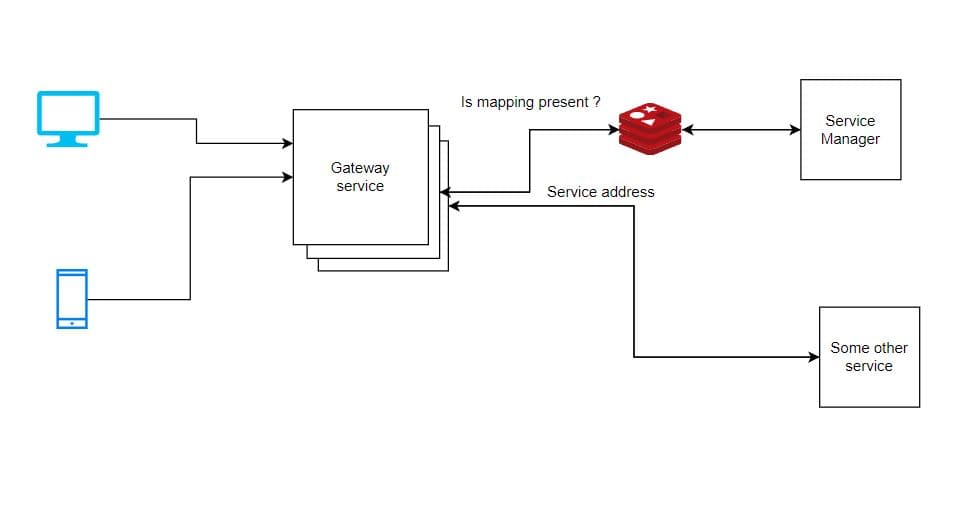
Requirement 2: Allowing users to login (2-FA) and register
We need to implement an auth service that allows users to log in using two-factor authentication and allows new users to register. We also need a profile service.
Components required
-
Auth service
- It checks if the username exists in the database and the password is valid.
- It also needs to validate the one-time code (within a fixed time interval), sent to the user of two-factor authentication.
- Furthermore, it also checks if the user is verified or not.
- It also updates the cache every time user data is updated.
-
Message Service
- It sends the one-time code to the user via email, SMS, etc.
- Furthermore, it has message templates for various cases.
-
Database
- For auth service, it stores the name, encrypted password and one-time code, and the user secret token which is used to authorize the user.
- For the message service it stores the templates.
- Profile service database stores details related to a user.
-
Profile Service
- It handles all the requests that involve creating and editing profiles.
-
Distributed cache
- User token is stored in the cache. So instead of making an API call to auth service every time, we make a call to cache which is more efficient.
Trade-offs
-
Using in-memory cache in gateway service v/s using distributed cache
-
If we are using an in-memory cache then we will have additional code and logic and more memory needs to be allotted which will result in a bloated service.
-
If we are using an in-memory cache then there is cache duplication because the gateway service is a distributed service, and it has multiple nodes. So updating the cache will cause an updated fan out.
-
If we are using an in-memory cache then we can access it using an in-process call which is faster than network calls to the global cache.
-
So it is better to implement a global cache
-
Diagram
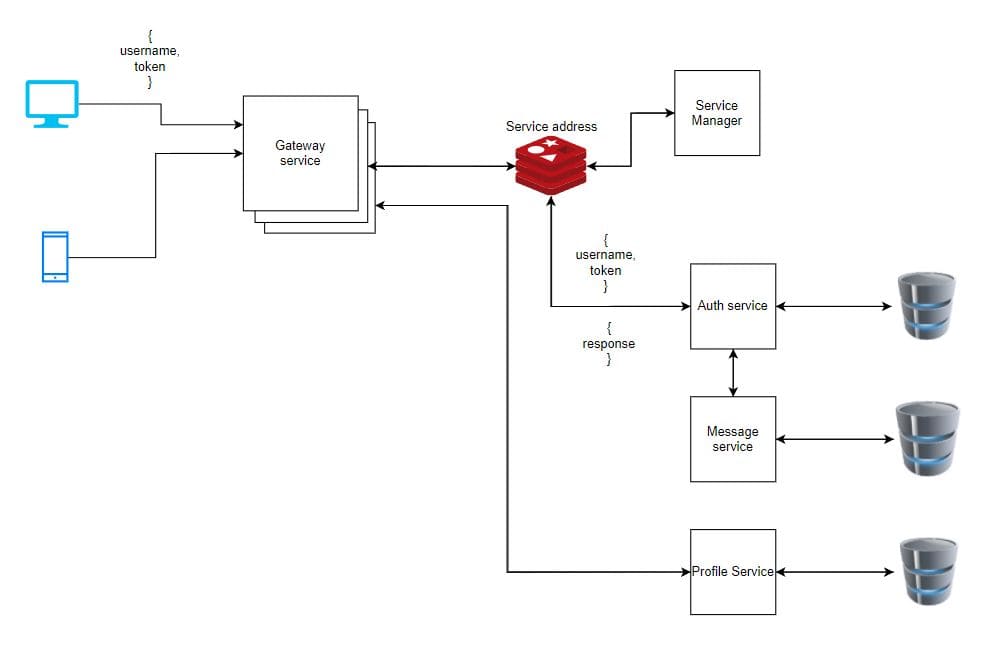
Contract Registry
- We get data in JSON format, and we need to convert it to a programming object.
- A contract tells the service how to convert a JSON object to a programming object.
- Different services can have different contracts.
- We use a contract registry to store all API contracts.
- Whenever there is a change in contracts services can pull the new code from the contract registry. This can be done either manually or we can restart the service.
- API contracts should be language-independent.
- Versioning contracts is important because it provides backward compatibility, allows users to switch to new contracts whenever they want and, we can avoid breaking changes.
Requirement 3: Sending, Tagging, and Searching emails
We need to implement services that can send emails and receive to/from the same and different domains and tag them. We need to implement a search engine to find emails by keywords. Also, we need a spam detector and a virus detector service.
Components required
-
Email service
- It receives email content, sender, and receiver address from the user.
- It also gets emails from the search engine service and sends them to users.
-
Message queue
- It receives an email from the email service and sends it to the preference and spam detector service.
-
Search Engine service
- It maps keywords in emails to their location.
- It uses an inverted index system to map content to its location.
-
Spam Detector service
- It checks the content/subject of the email and also the timestamps of emails to determine if the emails are spam or not.
- It can check the emails in regular intervals (like cron job) or whenever there is a new email.
-
Message queue
- Whenever there is a new email, the email service publishes an event to the message queue. Different services like spam detectors and search engines pull events from the message queue.
-
Virus Detector service
- It checks the content and attachments of emails for any virus.
-
Distributed File Service
- It stores all the attachments of emails.
-
Preference service
- It pulls emails from the message queue and assigns preference to emails.
Diagram
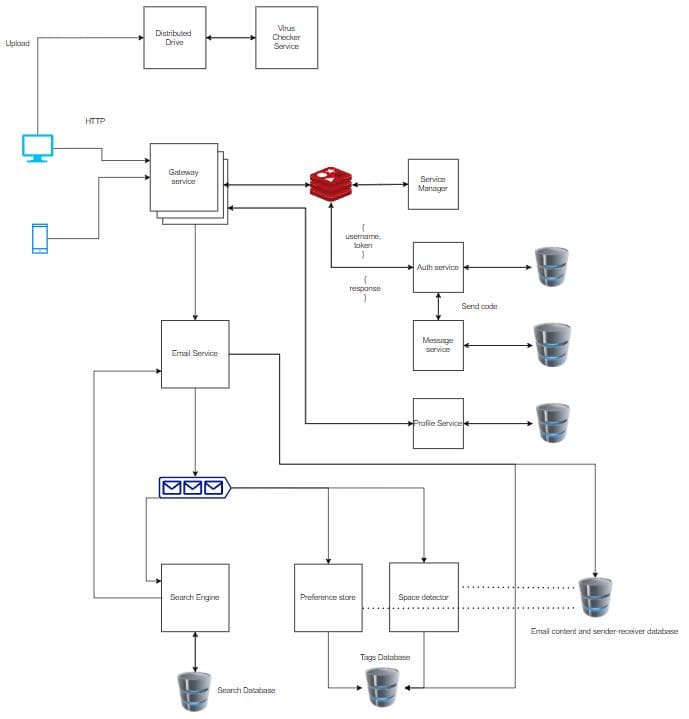
Requirement 4: Managing contacts and groups
Components required
-
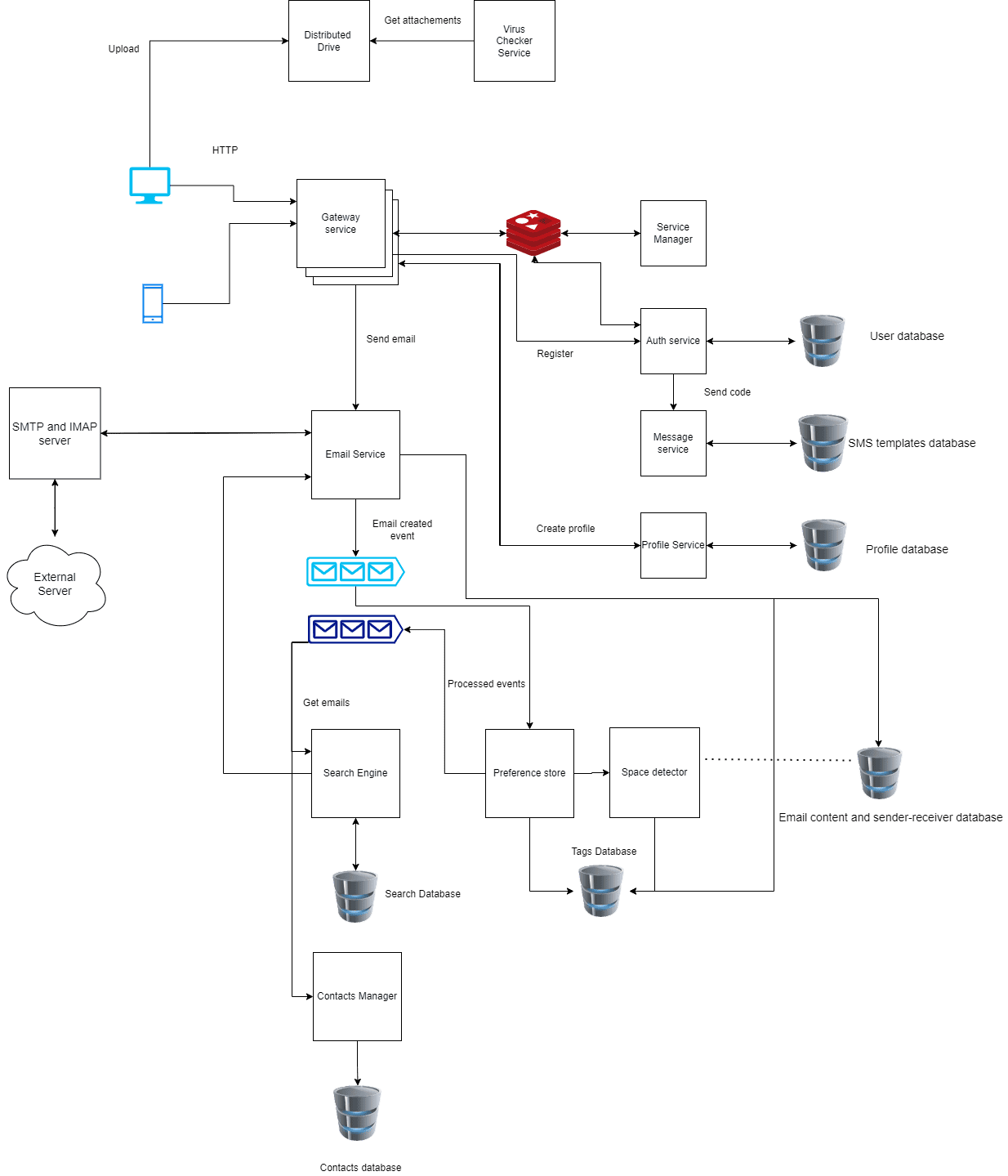
Contacts Service/ Contacts Manager
- It pulls processed emails from the message queue.
- It keeps the mapping of the sender to receiver.
-
Message queue
- The processed email events are pushed to this message queue.
- The search Engine and Contacts manager service pull processed emails from this queue.
-
SMTP Server
- SMTP stands for Simple Mail Transfer Protocol. It sends emails to an external server.
-
IMAP Server
- IMAP stands for Internet Message Access Protocol. It receives emails from an external server.
-
API Contracts
-
Gateway service
- void blockIPAddress(IPAddress, endpoints[] , duration)
-
Service manager
- void Register(service, ipAddresses[], endpoints[])
- Service routeRequest(service, request, apiEndPoint, user)
-
Auth service
- void register(username, password, phoneNumber)
- void login(username, password)
- token verify(username, otp)
- bool authenticateUser(usernamme, token)
- void logout(username, token)
-
Contact Registry
- void Register(service, contract)
-
SMS Service
- void sendSMS(receiver, sendingService, smsTemplate , params)
-
Profile service
- void createProfile(username, token, profilePictureURL, DateOfBirth, Gender)
- void updateProfile(username, profile)
- void deleteProfile(username, token)
- Profile getProfile(username)
-
Drive service
- void uploadFile(file, directory, uploader, accessControlList)
- void deleteFile(file, directory)
- File getFile(fileName, Directory, user, requestingActor)
- File[] getFiles(fileNames[] , user, requestingActor)
-
Contacts service
- void makeContact(sender, receiver)
- void deleteContact(sender, receiver)
- Group makeGroup(creator, members, name, groupPhotoURL)
- void deleteGroup(groupID, groupMember)
- void addMembers(groupID, user, members)
- void updateGroup(groupID, user, groupName, groupPhotoURL)
- User[] getUsersWithRoles(groupID, roles)
-
Email service
- Email sendEmail(sender, receiver, content, attachments)
- void deleteEmailFor(requesterID, emailID)
- Email getEmails(receiver)
- Attachement[] getEmailAttachements(emailID, requester)
-
Search Engine service
- Email[] search(searchParams)
-
Database design

That's it for now!
You can check out more designs on our video course at InterviewReady.